Printable template
Pixel Colour-by-Number 16x16 (Blank)
16x16 design-your-own colour-by-number grid.

The blank 16x16 pixel colour-by-number template steps up complexity from the 8x8 version, offering 256 cells and room for noticeably more detail in a student-designed puzzle. Students fill the grid with their chosen number codes, build a colour key, and produce a solvable pixel art challenge for a peer. Grades 1–7 find the 16x16 size a satisfying middle ground — large enough to create recognisable images like animals, flags, or simple portraits, but manageable within a single class period. Art teachers use it to introduce systematic colour planning, while classroom teachers leverage it for cross-curricular projects linking maths (coordinate grids, fractions) and early digital literacy. The design-your-own format rewards both artistic and analytical students.
Learning objectives
- Design a recognisable image within the constraints of a 16x16 grid
- Create and apply a custom number-to-colour coding key
- Develop systematic planning before committing colours to cells
- Introduce the concept of pixel resolution in an analogue context
- Foster peer engagement through exchangeable self-made puzzles
- Practise counting and area concepts by tallying coloured regions
How to use this template
- Print the blank 16x16 template and decide on your design — sketch a rough thumbnail alongside it first.
- Assign a number (1–12 or more) to each colour in the key section at the bottom of the sheet.
- Write the corresponding number lightly in pencil inside each cell of your design.
- Once happy with the layout, colour your own copy as the answer key.
- Print a fresh blank copy, write only the number key (not the colours), and give it to a classmate to solve.
Classroom & home ideas
- Assign students a theme (ocean, space, rainforest) and have each student design a 16x16 puzzle; compile them into a class puzzle booklet.
- Use the completed grids to practise fractions: 'What fraction of your grid is blue? Express as a decimal and percentage.'
- Pair with a social studies unit — students design pixel flags of countries they are studying, then swap and identify each other's flags.
- Introduce the template as a low-tech sprite editor before a Scratch coding lesson, using the grid to plan game characters.
- Run a gallery walk where finished answer-key grids are displayed and classmates try to identify the subject of each pixel image.
Skills practised
Frequently asked questions
How detailed can a 16x16 design realistically get?
With 256 cells you can clearly depict simple objects, animals, letters, or geometric patterns. Fine facial features or text smaller than two cells wide will be difficult — simpler, bold shapes work best.
How many numbers can the colour key hold?
The key section on the printable fits up to 12 colour entries, which is more than enough for a 16x16 design. Most student designs use 4–8 colours.
Can this be used as a maths activity rather than an art activity?
Yes. Students can use it to practise coordinate plotting, symmetry, or fractions by counting and calculating the proportion of each colour used across the 256 cells.
Is there a teacher answer-key provided with the blank template?
No — the blank template has no pre-set design. Students create their own image, so their completed colour copy serves as the answer key for whomever solves their puzzle.
Likes & comments
See what other teachers think and share a helpful note.
Create more worksheets in our Worksheet Studio
Generate fresh worksheets for any grade, topic, and language — free.
Open the Worksheet StudioRelated worksheets
School Event Coloring Pages Pack 2
Song-Writing Template
Sketchbook Page Template
Pixel Art Grid 64x64 (Blank)
Pixel Art Grid 32x32 (Blank)
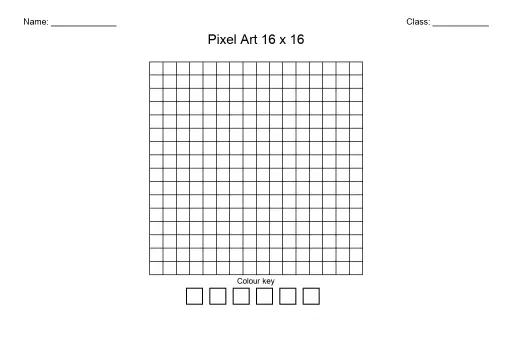
Pixel Art Grid 16x16 (Blank)
Step-by-Step Drawing Template
 For big organisations
 For schools
 For centers
 For team leaders
 For teachers
 AI and resources
 Printable worksheets
 Interactive simulations
 Teacher tools
 AI studio
 Ideas and research