For learning centers
 For learning centers
Run your learning center without unnecessary school-system complexity.
Center admins get a dedicated, center-scoped route for staff, classes, learners, families, curricula, schedules, policies, tasks, insights, and classroom activity—without campus or department layers they do not need.



In plain language
What is learning center management software?
It is a deliberately simpler KiwiBee workspace for organising learners, parents, teachers, classes, curriculum, schedules, and classroom work without requiring a multi-school hierarchy.
How the work flows
A simpler path from enrollment to teaching
Use only the structure a learning center needs, then connect it to classroom delivery.
- 1
Set up the center
Create the center profile, core settings, and the academic structure you actually use.
- 2
Add the learning community
Organise learners, parents, teachers, roles, classes, subjects, and curriculum.
- 3
Plan classes
Build schedules and keep each class connected to its people and learning context.
- 4
Teach and follow up
Use ClassSpark, assessment, resources, reports, and communication from the connected workspace.
The friction
When a center is forced into school-system complexity
Small education teams end up maintaining structure they do not need.
- Learner, parent, and teacher records sit in separate lists.
- Class schedules and curriculum context are rebuilt by hand.
- Classroom routines are disconnected from center operations.
The outcome
With a center-sized workspace
The platform supports teaching without adding unnecessary hierarchy.
- Learners, families, teachers, and classes share one context.
- Schedules and curriculum stay connected to delivery.
- Classroom tools and center follow-up work together.
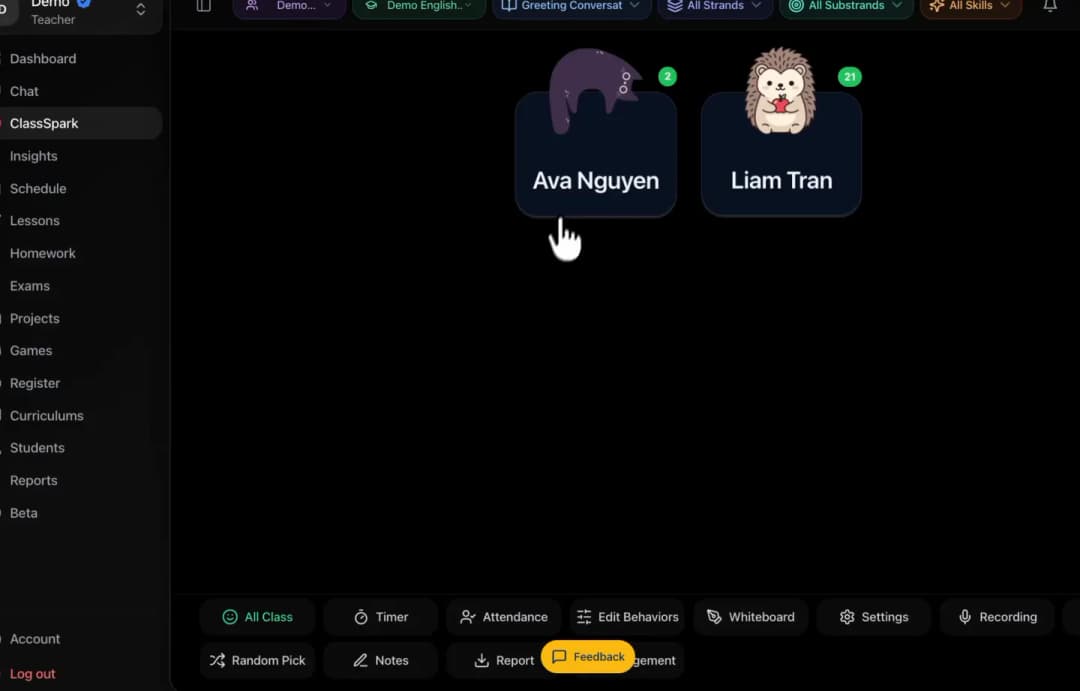
Real KiwiBee product proof
Teaching and daily work stay together
A real KiwiBee product view showing a role-focused workspace without invented center metrics.
Verified KiwiBee workflows
Everything a learning center needs to stay organised
KiwiBee keeps the center model deliberately focused on the people and learning inside that center.


Questions from this workplace
Learning center management questions
Answers for tutoring, language, enrichment, and other learning centers.
Is KiwiBee only for full K–12 schools?
No. Centers can use a simpler workspace focused on learners, parents, teachers, classes, curriculum, schedules, and classroom work.
Do centers need a campus or multi-school hierarchy?
No. The center story intentionally avoids unnecessary institution layers while retaining role and learning context.
Can teachers use ClassSpark in a center?
Yes. ClassSpark is a verified classroom workflow for routines, participation, recognition, notes, and connected follow-up.
Can centers organise parents and learners?
Yes. The verified people workflows include students or learners, parents, teachers, classes, subjects, and curricula.
How does AI fit the center workflow?
KiwiBee provides reviewable AI-assisted workflows for areas such as scheduling, lesson planning, worksheets, Gradebook questions, and contextual recommendations where available.
Keep exploring
Move to the next scope without leaving the platform.
These adjacent workplace pages explain how KiwiBee changes as responsibility moves across the learning community.

AI school management for K–12 schools
Manage people, classes, timetables, policies, tasks, and progress.
Explore this workplace
All-in-one teacher workspace for the school day
Teach, plan, manage classes, assess learning, and keep families connected.
Explore this workplace
Contextual AI for school and classroom work
Plan, create, adapt, review, and find classroom-ready materials.
Explore this workplaceA workspace that fits your scope
See KiwiBee around the work your team already does.
Tell us how your learning community is structured and we will show you the role-scoped workflow that fits.
 Home
Home All solutions
 Pricing
 About us
 KiwiBee for Non-profits
 Events & webinars
 For team leaders
 Resources
 Printable worksheets
 Lesson Packs
 Teacher tools
 AI studio
 Ideas and research