
Privacy: Permission Requests, Allow or Not Now
1 pagePrintable PDFScroll to explore
More like this worksheet
Picked by meaning from games, worksheets, simulations, teacher tools and videos.
 WorksheetPrivacy: Personal Data, Six Things Not to Share Carelessly
 WorksheetPrivacy: Privacy Settings That Control Who Sees and Contacts You
 WorksheetPrivacy: When to Ask an Adult for Help Online
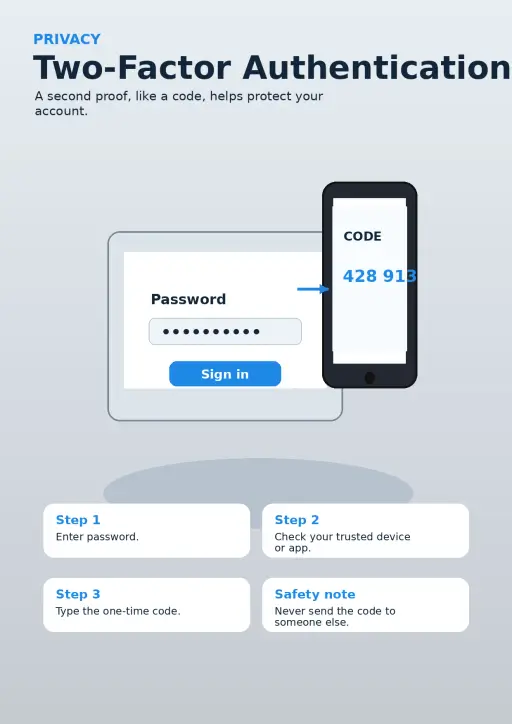 WorksheetPrivacy: Two-Factor Authentication and One-Time Codes
 GameA Kind and Private Digital Choice
 GameA Digital Footprint Case Study
 GamePasswords, Permissions and Help
 GameAccessible digital presentations Quiz for Grade 5
This Grades 3-8 ICT infographic is headed Permission Requests and shows a camera pop-up with Allow and Not now buttons. Below it are three checks: Does the app need this?, Choose the smallest access and Ask first if unsure. The notes add that a drawing app may need the camera but a calculator usually does not.
Learning objectives
- Ask whether an app really needs the access it requests
- Choose the smallest access, such as selected photos or while using the app
- Ask an adult first when a permission could reveal photos, contacts, microphone or location
How to use this worksheet
- Select “Sign in / Sign up to download”, then sign in with Google or email to get the WEBP, IMAGE from KiwiBee Printables.
- Print at home or in class for Grades 3–8; it's no-prep, with no extra materials needed.
- Hand it out as classwork, homework, or a quick warm-up.
Good for
ClassworkHomeworkWarm-upCentersSmall groups
Curriculum standards
Cambridge
- 5SW.01Understand the need to set security and privacy settings to ensure only content they want people to access is seen.Cambridge Primary Digital Literacy (0072) — Stage 5 › Skills, Workflows and Strategies › Skills, Workflows and Strategies
Learning objectives © UCLES (Cambridge University Press & Assessment), quoted with attribution.
More worksheets like this
Likes & comments
See what other teachers think and share a helpful note.
Loading likes and comments…
Worksheet Studio
Open Worksheet StudioNeed a different version? Make your own.
Generate a fresh worksheet for any grade, topic and language. Free.
 Home
 All solutions
 Pricing
 About us
 KiwiBee for Non-profits
 Events & webinars
 For big organisations
 For schools
 For centers
 For team leaders
 For teachers
 Resources
 Printable worksheets
 Interactive simulations
 Teacher tools
 Ideas and research


