
Type any function and see its shape straight away. Plot up to three at once in three colours to compare them, drag the trace point to read a value off a curve, and see where each one crosses zero.
—
KiwiBee uses optional Google Analytics, Google Ads, and Meta Pixel cookies to understand adult visitors, measure completed sign-ups, and improve campaigns. Essential cookies always stay on. OpenAI’s ChatGPT Ads Pixel also measures page views and completed enquiries after advertising consent, and may use hashed contact details for matching. Privacy policy
This simulation approximates the volume of a solid of revolution with thin discs, each of volume pi times f of x squared times dx. Students choose a curve such as square root of x, sine of x, a cone or a sphere, choose left, midpoint or right sampling, and set the number of discs from 1 to 100 or let Auto-add run. Readouts show the number of discs, the sum of discs, the exact volume and the error. Teachers can use it to introduce Riemann sums and the disc method in calculus.
Yes. It is completely free and runs in any modern web browser, including on interactive whiteboards, tablets, Chromebooks and phones. There is nothing to install and no sign-up or account is needed.
The solid is sliced into thin discs perpendicular to the axis. Each has volume pi times the radius squared times the thickness, where the radius is f of x. Adding them gives the volume.
Midpoint is usually closest for the same number of discs, because over- and under-estimates tend to cancel. Left and right errors are larger and opposite in sign for an increasing curve.
Choose a curve and sampling method, then increase the number of discs while watching the error. Compare the final sum to the exact volume.
Drop it into your LMS, blog, or class site — free.
<iframe src="https://kiwibee.io/en/simulations/solids-of-revolution-3d-simulation/embed" title="Solids of Revolution | KiwiBee" loading="lazy" allowfullscreen style="width:100%;height:min(70vh,620px);min-height:420px;border:0;border-radius:16px"></iframe>Continue exploring
Type any function and see its shape straight away. Plot up to three at once in three colours to compare them, drag the trace point to read a value off a curve, and see where each one crosses zero.

Spin a spinner, flip a coin or roll a die and watch two sets of bars: the chances the shapes predict, and the results you actually got. Ten spins prove nothing; a few hundred and the two are hard to tell apart.

Move m and watch the line tilt; move b and watch it slide. Or drag the two points on the line and read the equation it writes back. A rise-over-run staircase climbs the line so slope becomes something you can count.
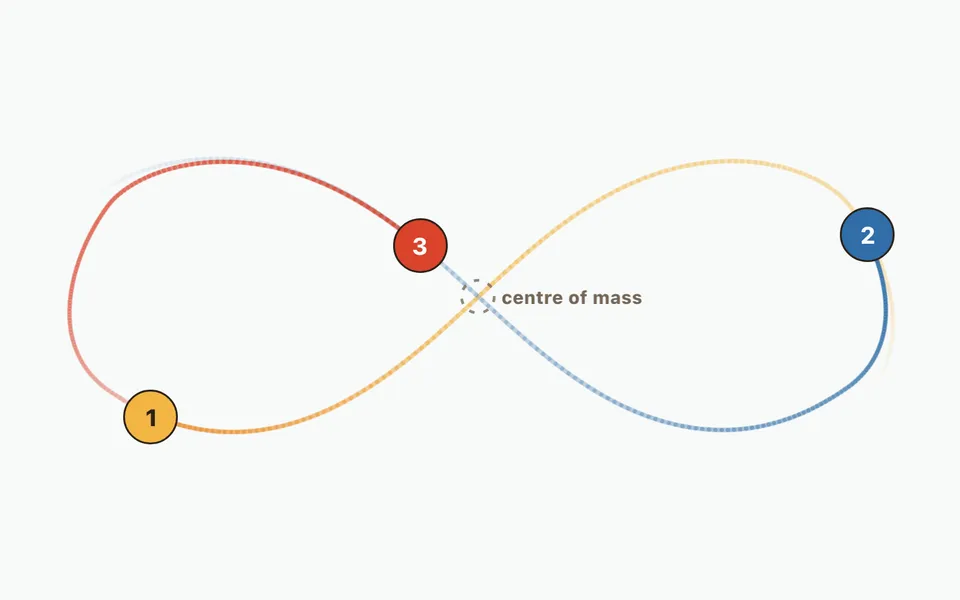
Compare a two-body orbit with three-body figure-eight motion, then add up to twelve bodies. Change initial masses, velocities and positions; watch orbit trails and numerical energy error.

Approximate the area under a curve with strips and choose how each takes its height: left edge, right edge, middle, or a sloping top. Push the strip count up and watch the error fall, with the running total plotted as its own curve.
From model to evidence
Use a worksheet to capture predictions, observations, and explanations after students explore.
KiwiBee's free teacher workspace brings lesson planning, worksheets, classroom tools, and gradebook together in one place.
Start free and create your first class Home
Home All solutions
 Pricing
 About us
 KiwiBee for Non-profits
 Events & webinars
 For big organisations
 For schools
 For centers
 For team leaders
 For teachers
 AI and resources
 Resources
 Printable worksheets
 Lesson Packs
 Interactive simulations
 Teacher tools
 AI studio
 Ideas and research