
关于这个模拟实验
3D Shapes Explorer is an interactive classroom tool for teaching solid shapes and their properties. Students and teachers turn a cube, cuboid, prism, pyramid, cylinder, cone, sphere or one of the five regular solids, then tap the shape to count its faces, edges and vertices together, with numbered labels and a see-through mode for the hidden ones. Each shape shows the 2D shapes that make up its faces, Euler's rule for corners, edges and faces, and a pattern finder for prisms and pyramids with 3 to 12 sides on the base. Further tabs unfold every solid into its nets, work out volume and surface area with the formula and the working shown, and slice the shape to reveal its cross-section.
学生可以探索什么
- Count the faces, edges and vertices of a cube by tapping them, then check the counts with Euler's rule.
- Switch on See-through to find the edges and vertices hidden at the back of a shape.
- Change the number of sides on a prism or pyramid and spot the pattern in its faces, edges and vertices.
- Unfold a cube and find all 11 of its different nets, then unfold a cylinder and a cone.
- Fill a cuboid with 1 cm cubes, layer by layer, to see why volume is length times width times height.
- Slice a cube from corner to corner and discover that the cross-section is a regular hexagon.
- Play Mystery shape: reveal clues about a hidden solid, then guess which one it is.
学习目标
- 1Name common 3D shapes and describe their properties using faces, edges and vertices.
- 2Identify the 2D shapes that make up the faces of a prism, pyramid or regular solid.
- 3Recognise and draw nets of cubes, cuboids, prisms and pyramids.
- 4Calculate the volume and surface area of cuboids, prisms, pyramids, cylinders, cones and spheres.
- 5Describe the cross-section made by slicing a solid, and use Euler's formula to check a count.
教师常问的问题
Is the 3D Shapes Explorer free to use?
Yes. It runs in any modern browser, including interactive whiteboards, tablets and phones, with no sign-up or download.
Which 3D shapes are included?
Sixteen solids: the cube, cuboid, triangular, pentagonal and hexagonal prisms, triangular, square, pentagonal and hexagonal pyramids, cylinder, cone, sphere, and the five regular (Platonic) solids: tetrahedron, cube, octahedron, dodecahedron and icosahedron. Prisms and pyramids can be changed to have anywhere from 3 to 12 sides on the base.
What are faces, edges and vertices?
A face is a flat surface of a solid, an edge is where two faces meet, and a vertex (plural vertices, also called a corner) is where edges meet. Tap Faces, Edges or Corners, then tap the shape to count them one at a time, or press Count for me.
How do the nets work?
On the Net tab, drag the slider or press Unfold to open the solid out flat. Press Another net to see different valid nets of the same shape. A cube has exactly 11 nets. A sphere has none, because its curved surface cannot be flattened without stretching or tearing.
Can students find volume and surface area with it?
Yes. The Measure tab has a slider for every dimension, labels the lengths on the shape, and shows the formula with the numbers substituted in. A cuboid can also be filled with 1 cm cubes, one layer at a time.
嵌入这个模拟实验
免费嵌入你的学习平台、博客或班级网站。
<iframe src="https://kiwibee.io/zh-cn/simulations/3d-shapes-simulation/embed" title="3D Shapes Explorer | KiwiBee" loading="lazy" allowfullscreen style="width:100%;height:min(70vh,620px);min-height:420px;border:0;border-radius:16px"></iframe>继续探索
更多互动科学模型

Spin a spinner, flip a coin or roll a die and watch two sets of bars: the chances the shapes predict, and the results you actually got. Ten spins prove nothing; a few hundred and the two are hard to tell apart.

Type any function and see its shape straight away. Plot up to three at once in three colours to compare them, drag the trace point to read a value off a curve, and see where each one crosses zero.

Move m and watch the line tilt; move b and watch it slide. Or drag the two points on the line and read the equation it writes back. A rise-over-run staircase climbs the line so slope becomes something you can count.

Two bodies under gravity trace an ellipse forever and you can write the formula down. Add a third and no such formula exists. Run the figure-eight orbit, nudge one mass, and watch a stable pattern become unpredictable while the total energy stays put.

Two paths start a hair apart and follow the same three equations. Watch them agree, then part onto opposite wings of the butterfly. Drag the start, spin the shape and pull rho down until chaos stops.
从模型到记录
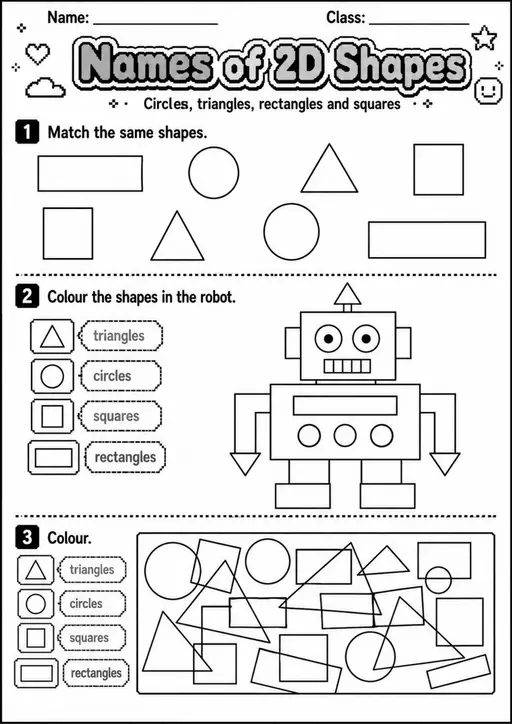
为这个模拟实验搭配一份可打印工作表
学生探索之后,用工作表记录他们的预测、观察和解释。
把互动科学带进你的课堂
KiwiBee 的免费教师工作台把备课、工作表、课堂工具和成绩册集中在一处。
免费开始,创建你的第一个班级 首页
首页 全部解决方案
 价格
价格 关于我们
关于我们 KiwiBee 非营利组织计划
 活动与网络研讨会
 面向大型教育集团
 面向学校
面向学校 面向教育中心
 面向团队负责人
 面向教师
面向教师 AI 与教学资源
 教学资源
教学资源 可打印练习单
 课程包
课程包 互动模拟实验
 教师工具
教师工具 AI 工作室
 灵感与研究
灵感与研究